ShadowClip
For Mac, iPhone and iPad.
Redact screenshots before you share them.
Names, faces, card numbers and API keys end up in screenshots, and then in chats, tickets and AI tools. ShadowClip finds them on your Mac or iPhone, shows you what it found, and saves a redacted copy. The original stays as it was. Nothing is uploaded.
- Freefor one image at a time
- $7.99once, for ShadowClip Pro
- Offlinenothing is uploaded
- 30languages of text read

Covered when it is certain, framed when it is not.
Each kind of thing has its own detector, and each detector is only as sure as it can be.
 123
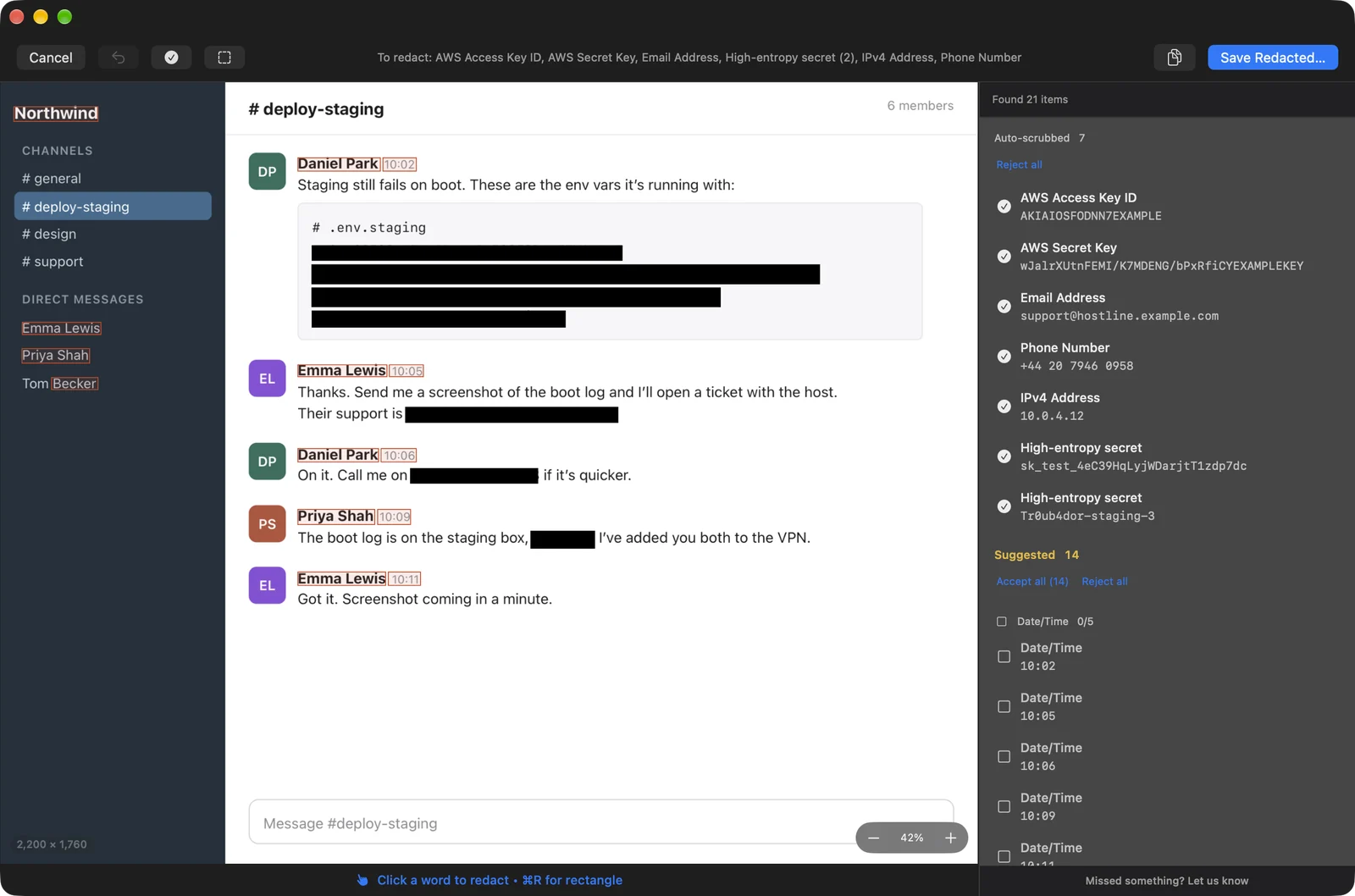
Covered without asking
The keys, email address, phone number and IP address are covered already.
Framed for you to decide
A name is a suggestion, framed on the image, because nothing can check a name the way a card number is checked.
Every finding listed
Accept or dismiss each one, click any word to cover it, or draw a box over anything else. Undo is there until you save.
Redact a name once, in every image.
Up to 20 images, reviewed side by side and saved together. In ShadowClip Pro.
 123
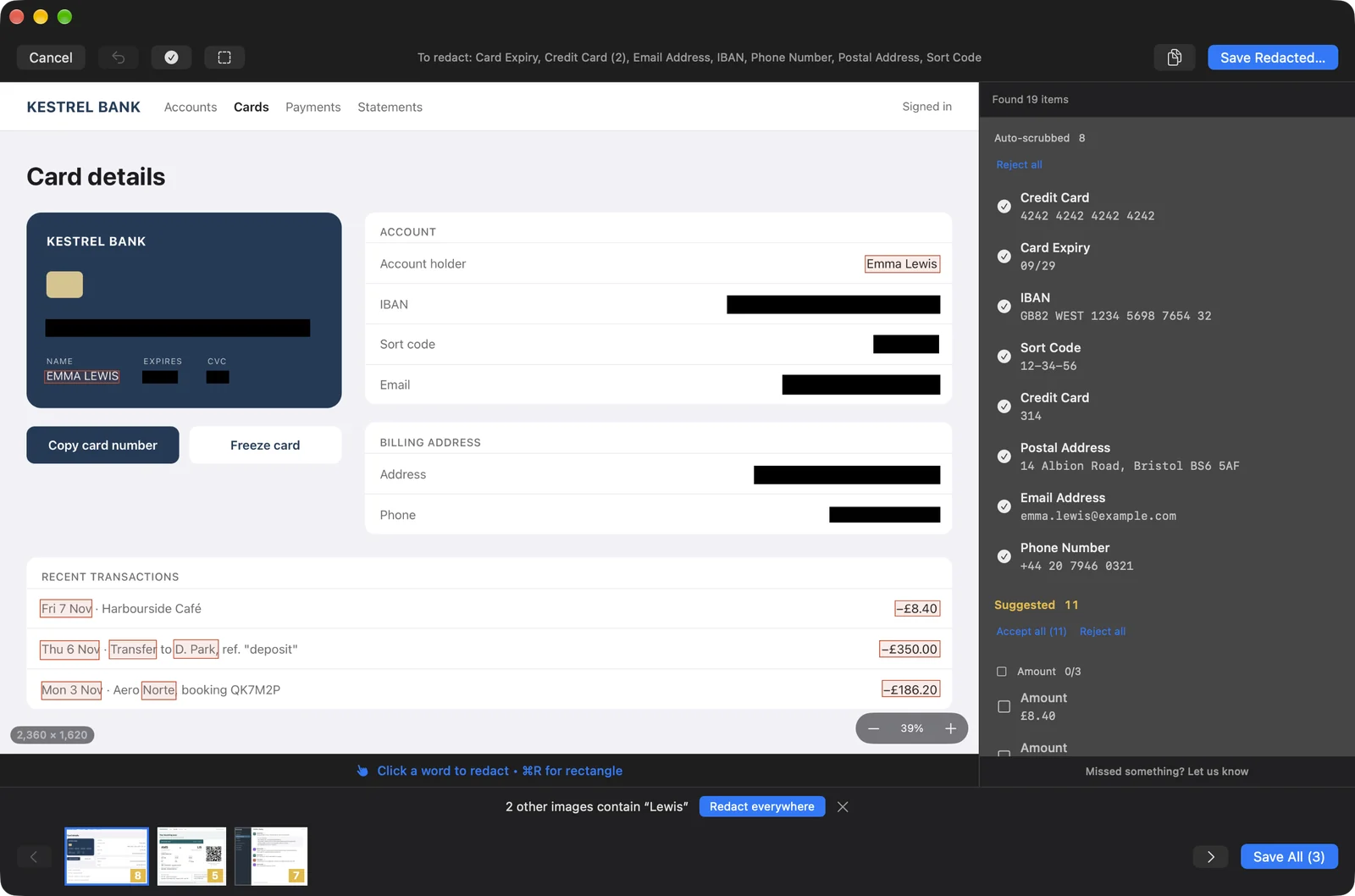
Every image in the strip
The strip at the bottom shows every image and how many things are covered in each.
Redact everywhere
Cover something once and ShadowClip offers to cover it in the other images.
Saved together
Each image is checked exactly as a single one is, and each redacted copy is a new file.
What it could not read, it marks.
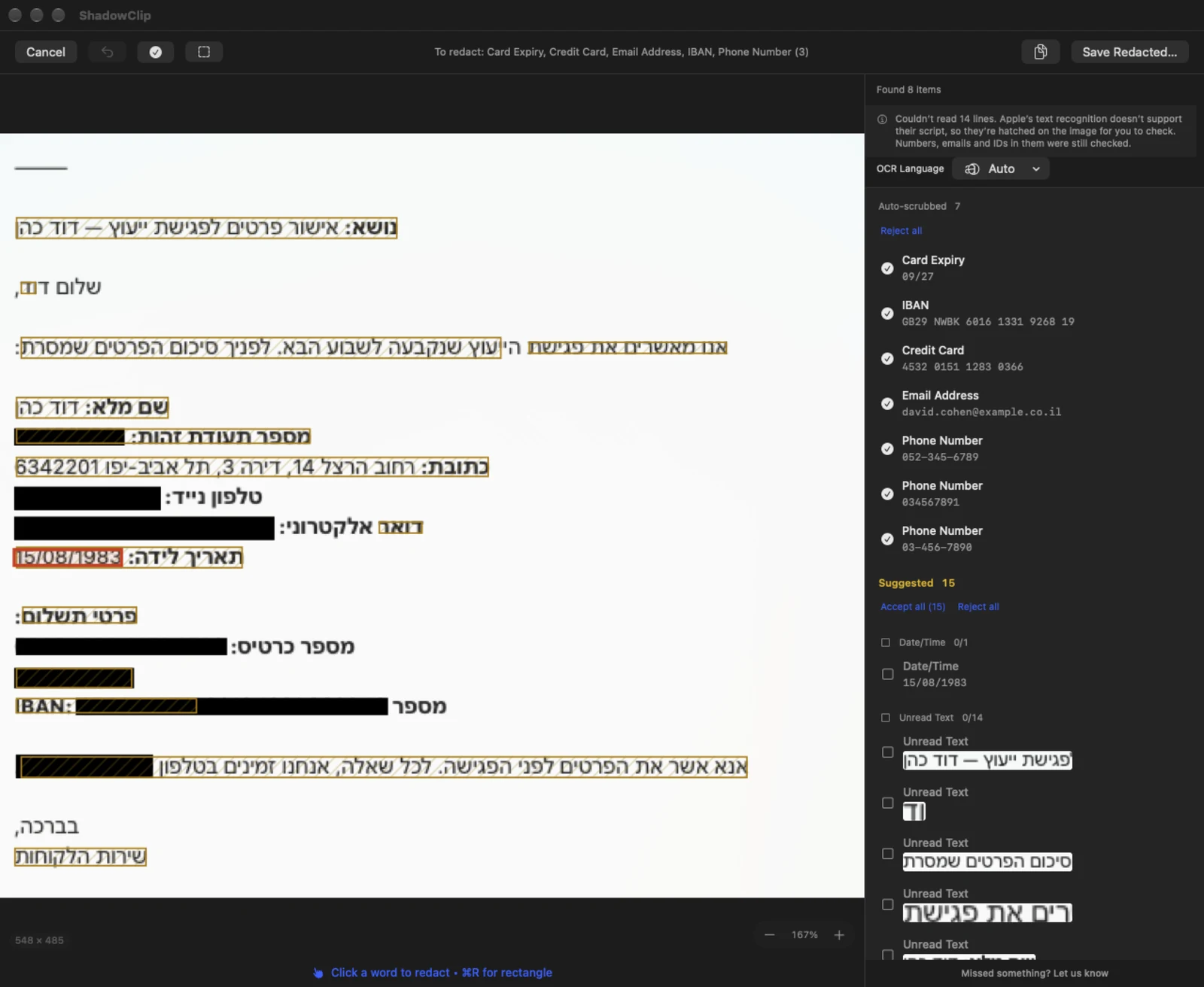
Apple’s text recognition cannot read Hebrew, Greek or Hindi. ShadowClip does not pass over them.
 123
Marked as unread
The labels could not be read and are marked as unread, so nothing passes silently.
The values are still found
The numbers, email addresses and ID numbers beside that text are still found.
Said in the list
The list says what was not read, so you can see exactly what wasn’t checked.
What it finds.
From the text of a screenshot and from its pixels. Each finding is listed for you to review.
Credentials
API keys and tokens in more than 20 formats: AWS, OpenAI, Anthropic, GitHub, Stripe, Slack, JWTs and others.
Payment details
Card numbers and IBANs, each checked against its check digit. A card’s expiry date and security code go with it.
Identity numbers
National ID numbers for 29 countries, each matched to its own format and check.
Contact details
Email addresses, phone numbers and postal addresses.
Network addresses
IPv4, IPv6 and MAC addresses.
Faces and codes
Faces, QR codes and barcodes, found in the pixels. No text needed.
Names and places
People, organisations, places, dates of birth and signatures. Suggested, never covered without you.
In 30 languages
Arabic, Chinese, Japanese, Korean, Russian and Thai among them. What it cannot read, it marks.
Pay once, if at all.
One purchase for the Mac, iPhone and iPad apps, shared with your family. No subscription.
ShadowClip
Free
One image at a time, and it stays free.
- Every detector, in every language
- The full review, with undo until you save
- Open from Photos, the share sheet or a Finder Quick Action
- A new file: solid fills, no metadata carried over
ShadowClip Pro
$7.99
Once. Everything in ShadowClip, and:
- Batches of up to 20 images, saved together
- Redact everywhere: cover something once, in every image
- An always-redact list for names, clients and codenames
- Save as PNG, JPEG or HEIC
- Shortcuts actions on the Mac and iPhone
Questions.
Anything else? Write to hello@quietsignalslab.com with your macOS or iOS version and what happened.
Does ShadowClip send my screenshots anywhere?
No. The app has no network entitlement, so macOS and iOS refuse it any connection. No account, no analytics, no crash reports; the App Store handles the Pro purchase in its own process. On a Mac you can check it yourself: a network entitlement would show up by name.
codesign -d --entitlements :- /Applications/ShadowClip.app | grep network
# prints nothing
Does it catch everything?
No, and nothing does. Numbers with a check digit, email addresses and key formats are found reliably; names and addresses are suggestions, and on unusual names or non-Latin text they are missed more often. That is why there is a review step. Look at the image before you share it.
Can a redaction be undone?
Until you save, yes: the review has full undo. After you save, no. The covered areas are solid fills composited into a new image, so there is nothing underneath to recover. The original file is never changed.
Does it strip metadata?
Yes. The saved copy is re-encoded from pixels, so camera, location and other file metadata from the original are not carried over.
Which languages does it read?
Text in 30 languages, including Arabic, Chinese, Japanese, Korean, Russian and Thai, with ID numbers matched country by country. The interface comes in 17, right to left for Arabic and Hebrew. Apple’s text recognition cannot read Hebrew, Greek or Hindi; ShadowClip marks that text as unread so you can see what wasn’t checked, and still finds the numbers, email addresses and ID numbers beside it.
Does it work on iPhone and iPad?
Yes, with the same detection, the same review and the same purchase as on the Mac. Pick photos from your library, or share from Photos, Safari or any app with a share sheet. Review by touch, then save back to Photos or to Files.
What does the audit file contain?
It is off by default. When on, a small JSON file is saved beside the image recording what kinds of things were covered and where, never the text itself, plus a checksum of the saved image.
Subscribe to our newsletter
Occasional email from Quiet Signals Lab: new software, releases and writing.