Sememe
For iPhone, iPad and Mac.
The same file,
in your language.
Sememe translates PDF, Word and Excel files and photos and gives you back the same file, laid out as it was, in the same typefaces, with numbers, dates and IBANs exactly as written. Translation happens on your device and works offline. 25 languages are supported.
- Freefor your first five documents
- $7.99once, for Sememe Pro
- Offlinetranslated on your device
- 25languages, translated by Apple’s on-device models
Get Sememe

iOS 26.4 or later, macOS 26.4 or later. No account.
Every page drawn as it was.
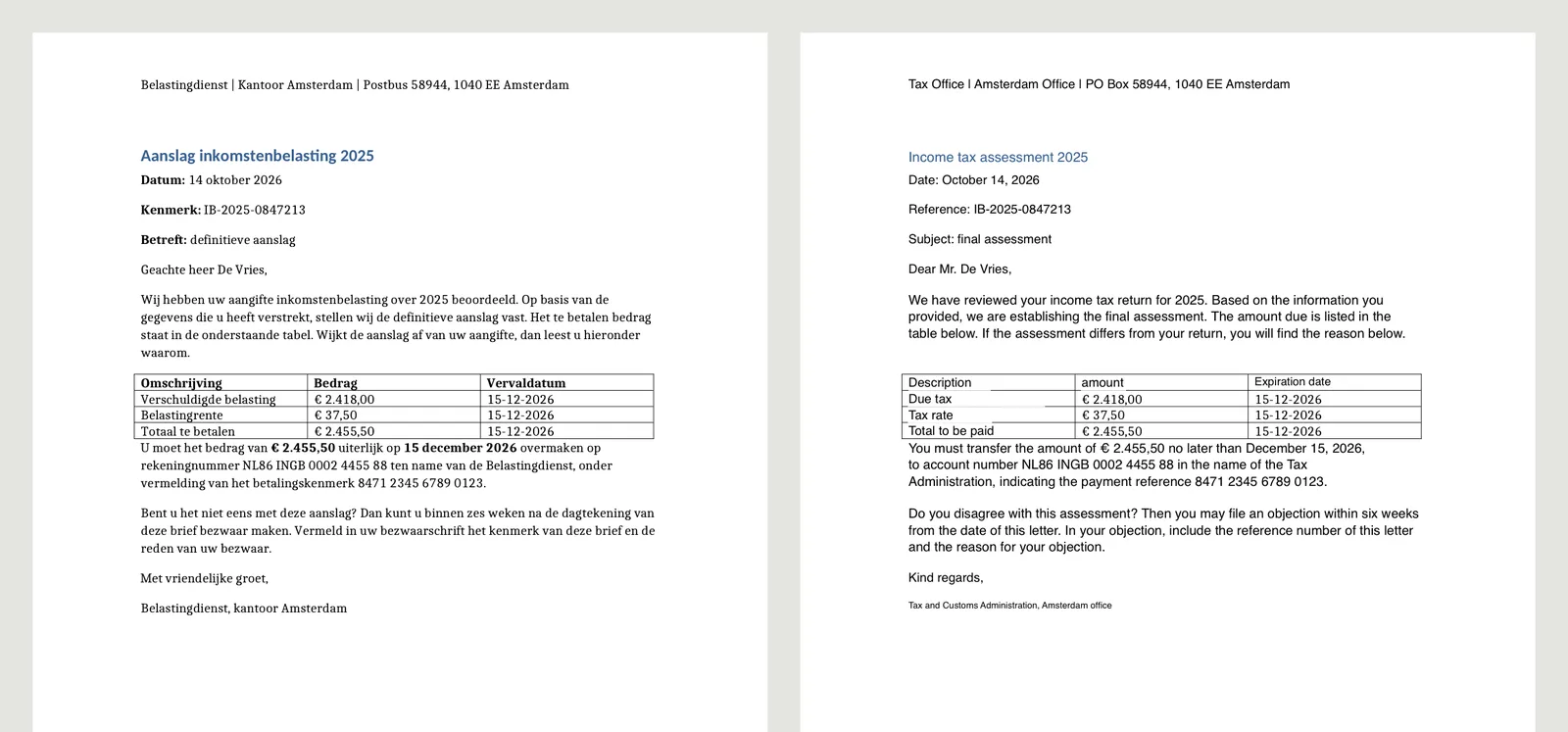
Each passage is replaced by its translation in the same place, in the document’s own typeface.
 123
Each passage in its place
Headings and paragraphs stay where they were, as they were set.
Tables stay tables
The table keeps its rows and columns; only the words change.
Numbers as written
Amounts, dates, reference numbers and bank details stay exactly as written.
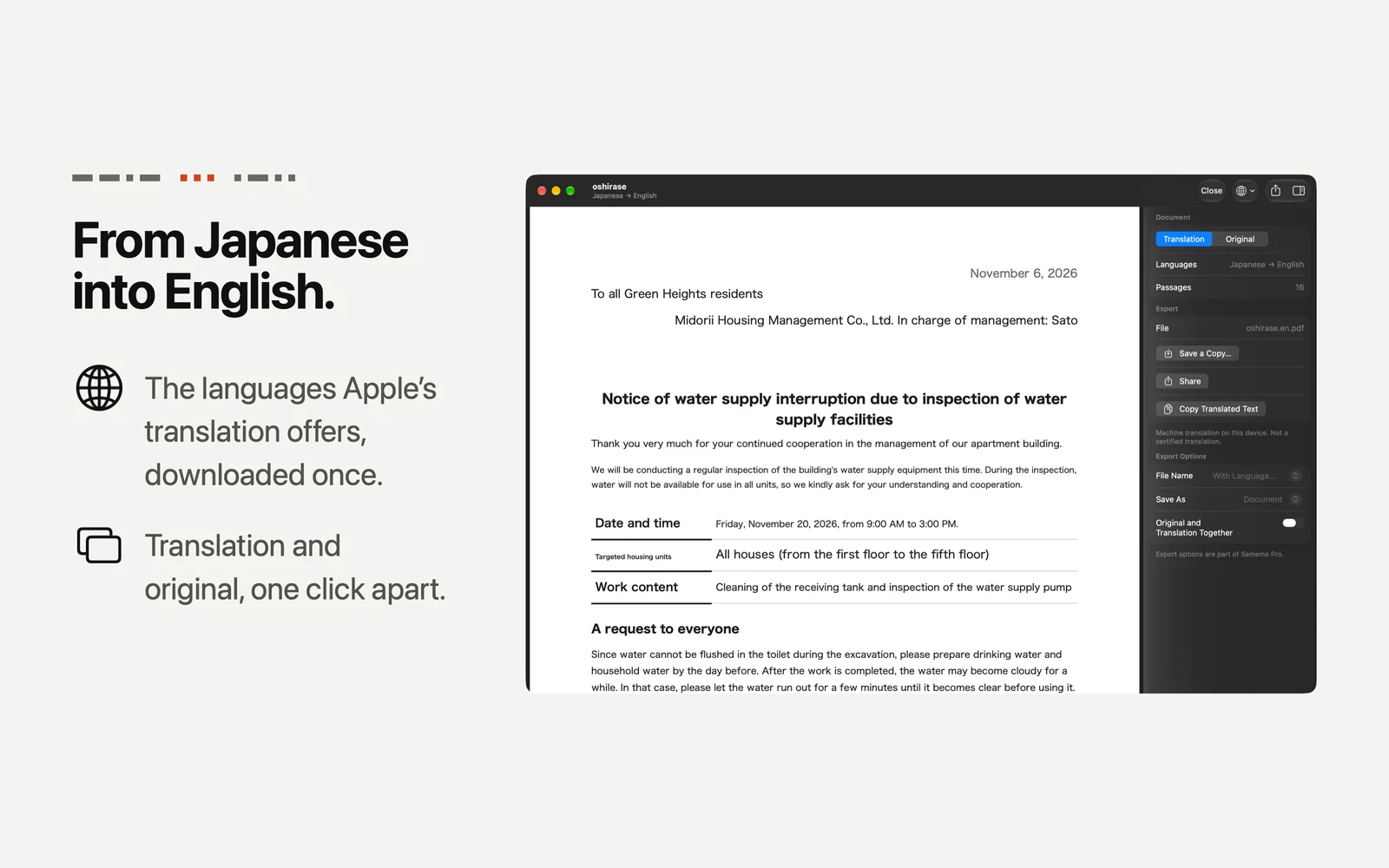
The original is one click away.
Any passage can be checked against what it said, on the same page.
 123
Laid out as the original
The date, the times and the table are where they were.
Translation and original
Switch between them without leaving the page.
Save, share or copy
Save a copy, share it, or copy the translated text.
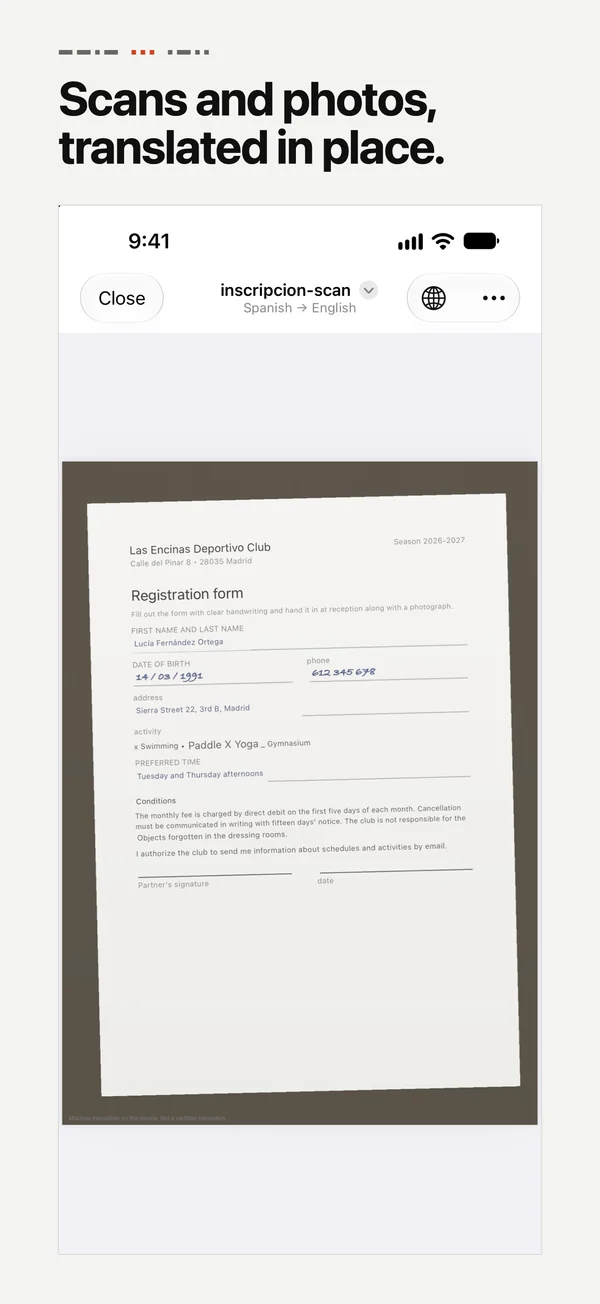
Scans and photos, translated in place.
The text is read on the device and translated over the picture, as a PDF.
 123
Printed text translated
The form’s printed text is in English, over the picture.
Handwriting left alone
What was written by hand stays as written.
Says what it is
Every translated PDF carries a line saying it is a machine translation, not a certified one.
What it translates.
Headings, tables, amounts, dates and bank details stay where they were, as they were written.
PDF
Every page drawn as it was, each passage in its place, in the document’s own typeface.
Word
Paragraphs, tables, headers and footers translated in place; styles untouched.
Excel
Cell text translated; formulas, numbers and sheets left alone, so totals still add up.
Photos and scans
HEIC, JPEG, PNG, TIFF and more, translated over the picture as a PDF. A letter photographed page by page becomes one document.
Paper
On iPhone and iPad, point the camera at a letter.
25 languages
Arabic, Chinese, Dutch, French, German, Japanese, Polish, Spanish, Turkish and Ukrainian among them. The app itself is in 17.
Checked against the original
The original is one tap away, the places worth a second look are listed, and the translated text can be copied.
Offline
Apple’s on-device models translate. After a language pair’s first download, no connection is needed.
Pay once, if at all.
One purchase for iPhone, iPad and Mac, shared with your family. No subscription.
Sememe
Free
Your first five documents, translated in full.
- Every format and every language
- Translated on your device, offline
- The original one tap away
- Save, share or copy the translation
Sememe Pro
$7.99
Once. Everything in Sememe, and:
- Every document after the first five
- Several documents at once
- Export options
- A Shortcuts action
Questions.
Anything else? Write to hello@quietsignalslab.com with your iOS or macOS version, the languages involved and what happened.
Does Sememe upload my documents?
No. Translation runs on Apple’s on-device models, and Sememe has no server, no account and no analytics. The language models are downloaded by the system, once per language pair, not by Sememe. The Mac app has no network entitlement, so macOS refuses it any connection; you can check it yourself.
codesign -d --entitlements :- /Applications/Sememe.app | grep network
# prints nothing
Is it a certified translation?
No. It is a machine translation, made to help you understand a document. Every translated PDF and Word file says so in a small line at the foot of the page. Where an authority asks for a sworn or certified translation, you still need a translator.
Why does it ask me to download a language?
Apple’s translation models are installed per language pair. Sememe asks the system to download a pair the first time you need it, and after that it works offline. You can also add pairs yourself: on iPhone and iPad under Settings › Apps › Translate › Downloaded Languages, on the Mac under System Settings › General › Language & Region › Translation Languages.
What does it get wrong?
It is machine translation, so wording, and sometimes meaning, can be off; check anything that matters against the original. In PDFs, a bold or italic word inside a sentence takes the sentence’s style, and a passage whose translation runs long is set in smaller type; anything that still doesn’t fit is listed as a place to check.
Subscribe to our newsletter
Occasional email from Quiet Signals Lab: new software, releases and writing.